
The Lenovo IdeaCentre Horizon has its drawbacks. Like size. And price (better with the IBM discount, though). And this review reports poor battery life and some trouble with the touch screen interface. But they still gave it four out of five stars.
I'll admit that my first reaction to a computer that doubles as a placemat was, "Why on earth would you want a screen that lies flat on the table?" It's just itching to have stuff put on it. And it has 'way too big a footprint. Moreover, you'll see in the first video below that small children are using it on the floor. Hasn't anyone at Lenovo seen a house with children? The first thing a toddler would do is step on it. Did I mention this is a $1500 piece of equipment?
Nonetheless, I can see why the folks in the limo ad are excited. Why are we excited? Picture games on the Maggie P. deck without pieces blown over the edge or dropped through cracks! We are not, mind you, excited enough even to think about purchasing such a thing, but the concept has potential.
Most of the time, I love computers and all the wonderful things advancing technology has brought us. But sometimes I feel like a friend of mine, who sent me a typed letter with this handwritten note at the bottom:
This is/was an e-mail. I hit the wrong key. It "saved" in My Documents, but I couldn't e-mail. My solution—good old US postal service. I understand they need the business.
I couldn't have better summarized my ambivalence toward high-tech devices. Back in the 1970's, when I was paid to work with computers—yes, we did have computers back then, not that most people today would recognize them as such—I used to say that computers were half voodoo. Now I'm sure they're up to 90%.
Anyway, the comment made my day, and Porter's too.
All my e-mails are sorted and ordered and I know what needs to be done in a timely manner and what can wait. The former have been sorted into "Action" folders, and I know to give them top priority. But all the e-mails that now reside in various Project and Someday folders no longer trouble me, as I know there is no hurry, and I can get to them whenever I feel I have the time and energy to tackle them. What's more, they are organized, so that if I decide to work on accumulated reading, or educational materials, or computer enhancements, I can navigate immediately to the relevant material.
I wrote that a week ago. It's still true. (It's still amazing.) What's more, I have reduced an e-mail backlog of more than 600 to 64, and not by declaring e-mail bankruptcy, but by dealing with each one. I don't expect the number to get much lower: the point of e-mail is to use it, after all. But what remains is in useable form, filed and easy to access. If I keep it under 100, I'll be thrilled.
However, there's a downside. Frankly, taking care of e-mail has become an obsession. I can't stand to have anything in my inbox, which is a good thing because if I can deal with it quickly I do, and if I can't, I file it appropriately. In addition, I've obviously spent a lot of time slashing my backlog by 90%. That, too, was a very good thing. But as I said, I'm obsessing. I'm spending too much time checking e-mail, just so I can deal with it. If I'm working on something else and notice that mail has arrived, I immediately drop what I'm doing to take care of it.
That was okay for the first week, but it's time to move on.
The point of e-mail control is not to get rid of all e-mails as soon as they come in; it's to deal with them effectively and efficiently, in a timely manner, and not allowing the important to get lost because of a poor signal-to-noise ratio. What I need now is to let go my Death Grip of Control a little. To acknowledge that
- the last 10% of my e-mails will take a lot longer to dismiss than the first 90%
- their numbers will continue to ebb and flow somewhat
And that's fine, because as long as
- I review them regularly so that I know I'm not neglecting something that can't wait
- I keep on top of them so that the flow doesn't overwhelm the ebb
all will be well.
My e-mail system, after all, is much like a Tickler File/Next Action Lists/Project Folder GTD system. There's no point in an empty Tickler, and no need to check it obsessively. Each day you check it once, deal with what you find, and then forget about it until the next.
My plan it to try to force myself to "check my E-mail Tickler" once each day, and do what needs to be done. That doesn't mean I'll only read e-mail once a day. I'll never be a Tim Ferriss and check e-mail once a week or less, because I've chosen e-mail as my primary form of communication. I might be able to manage his recommendation to check e-mail only twice a day, but I don't think so: I wouldn't want to miss the e-mail that says our grandchildren are asking to Skype! (Though of course that will happen anyway, unless I get a phone smart enough to nudge me when an e-mail arrives, and I'm in no hurry for that.)
What it does mean is that while I may clear my Inbox more frequently, unless the e-mail is one that (1) I can take care of in less than two minutes, (2) I would particularly enjoy answering right away, or (3) urgent, I will file it in the appropriate folder and forget about it until "Check E-mail Tickler" comes up again the following day. (Actually, I may not forget about it completely, because several of my e-mails are parts of ongoing discussions, or for other reasons will provoke long, thoughtful responses. In such cases, Li'l Writer Guy will always be busy in the background. But that's pleasure, not guilt.)
And in case you're wondering why I haven't answered the e-mail you sent, checking my e-mail tickler means making sure I know what can wait and what can't, and dealing with the latter. And then, if I have time, some of the former. If you think I've misclassified your e-mail, feel free to nudge me with another.
This is not going to be easy. There's always the fear that—as has happened with so many other of my efforts—letting go of iron-fisted control will cause the system to implode. But a system that requires so much maintenance is of no use at all. So it's time to take a risk, pry my clenched fingers off the reins, and let the system do what it's designed for.
Permalink | Comments
Category Computing Everyday Life Foundations 2013
When I first learned that Google Reader was going away, I was even more upset than when the demise of iGoogle was announced. After a brief tantrum, I decided it was a good lesson in the importance of not becoming dependent on things over which I have no control. I know: We depend on city water, we're tied to the grid for power, and losing the Internet would be almost as crippling as losing the first two. But a little independence is better than none.
Today I realized that I'm actually grateful for Google's nefarious actions. Not to justify Google's leading people into addiction then cutting them off cold turkey, but what they did offered me the perfect opportunity to declutter my blog world. And what a victory that was.
I began by looking at various Reader alternatives. Because nothing jumped out at me as the obvious course, I decided to see if I could do without any feedreader at all. The first step was to cull the many feeds that were outdated (some of them with no posts since 2009!), or in which I'd lost interest, or which I find too interesting (i.e. take up too much time, such as the Front Porch Republic, which is filled with frequent, thoughtful, interesting posts that take a long time to read and even longer to respond to). It took much of the day to do it, but it made me so happy!
Thus I managed to whittle over 100 feeds down to a couple of dozen. This is how I am dealing with those that remain:
- For many I was able to activate an e-mail subscription. Now that I have my e-mail under control (what a thrill to be able to say that!) I'm not afraid to add this, and I have a filter that files my blog subscription e-mails directly into my "Read" Action folder.
- For some I determined that I was receiving the same information, or at least a link to the blog, from Facebook, so as long as I keep up with Facebook, I'll get the important news. If I want I can even have Facebook e-mail me the posts.
- Some are updated at a rate that makes checking them weekly a viable option. These I have aggregated into a folder on my Firefox Bookmarks Toolbar called "Blogs Weekly." Once a week I can click on the folder, choose "open all in tabs," and rapidly flip through them to check for new posts.
- Others (mostly family blogs) I want to check daily, so I have a similar folder labelled "Blogs Daily." Each of the Weekly and Daily folders contains less than a dozen tabs, and I plan to keep it that way.
- There are only two blogs I can't handle with any of the above methods: Lime Daley, and Daley Pictures. These are updated infrequently enough I don't want to check them unless there's news, but when there is news, I want to know quickly. Fortunately, for both of them I'm likely to hear directly from the people involved if there's something I should know.
For now, I'm keeping my (radically trimmed) Google Reader feeds in parallel with my new system as I try it out. But I think I'll like it. It's neat, clean, orderly—and has been reduced to only those feeds that, per FlyLady, are a blessing!
Permalink | Comments
Category Computing Foundations 2013
And newspapers wonder why subscription rates are down! The news is bad enough without adding insult to injury.
The Orlando Sentinel had the nerve to run Grandpa, Meet Facebook, an article by Tribune author Jenniffer Weigel. (The link is not to the Sentinel because they've adopted the annoying habit of charging for online story access.)
The author begins by telling us that it's "scary" that her mother wants to learn to use Facebook. Then she quotes Mary Madden, from the Pew Internet Center.
"This is a pretty unique moment in time where grandkids and grandparents can be interacting at the same time, and more seniors are getting a taste of this and seeing the benefits," Madden said.
Whatever this generation may be good at, it's not history. For most of human time grandkids and grandparents have been interacting just fine; it's recent times that have separated them.
Here's another insult:
But the learning curve for the older crowd to master a site like Facebook can be steep, according to Abby Stokes, author of the book "Is This Thing On? A Computer Handbook for Late Bloomers, Technophobes and the Kicking & Screaming" (Workman).
"I refer to anybody over the age of 40 as a digital immigrant," Stokes said. "You can learn anything but you learn it at a slower pace."
Excuse me? We were busy inventing the Digital Age before you were born, you young whippersnapper! It's not technology that keeps me from mastering smart phones and iPad-equivalents. It's money, plain and simple. We were brought up to be more careful with our money than to pour it into the latest electronic gadgets.* Give me one of those devices (and a subscription, which is the worst of the cost) and I'll gladly take on the supposed challenge.
*I don't suppose I should try to get away with that statement, given that I've already confessed to spending $1500 on an intelligent terminal, then about a third of that to fix it when it broke, and then $800 on a dot-matrix printer. And this was back in the 70's, when that was a lot more money than it is now. Still, money is the biggest reason (along with a dislike of Apple) I don't go for the newer devices; it's not for lack of desire bordering on covetousness.
Once again, Eric Schultz (The Occasional CEO) has come up with just the right note. My list of his serious posts I want to share and comment on grows longer, but this one popped right to the top. So true, so true.
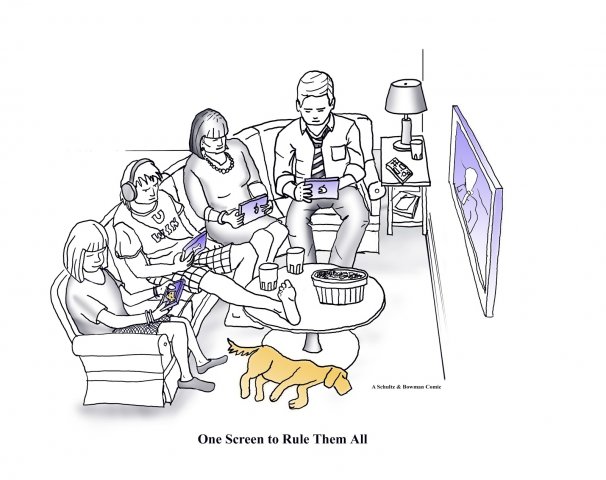
As I said in a comment to his post, it reminded me of a Christmas scene from 2003: Like this one, it's a living room setting with five people. Three are busy with computers on their laps. (This was almost 10 years ago: no iPhones, no iPads.) The fourth is also intently focussed, not on a computer screen but on the fifth, a newborn baby. No, not that newborn baby, but I did title the picture, We Three Nerds. Oh, wait. This is my own blog; I can include the picture itself.
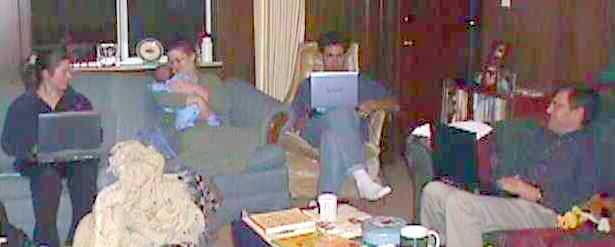
Sorry it's such a lousy picture. Our camera at the time was an old Sony Mavica, at one time high tech, but it created small files and saved them to a 3.5 inch floppy disk, which couldn't hold even one picture from my present (inexpensive, Kodak) camera.
Permalink | Comments
Category Computing Just for Fun
Recently, I bought a new 500GB hard drive from Western Digital. This despite the fact that the salesman told me external drives will soon be a thing of the past. All will be in The Cloud. I'm all for cloud storage, but I still like to have some of my data on a drive I can hold in my hand.
I still read books, too. Paper ones.
But back to the matter at hand.

What you see is the entirety of the instructions for installing the drive. And it really was that simple: I plugged one end of the cord into the drive and the other into a USB port on the computer; Windows 7 recognized the device, installed the drivers, and almost before I could blink, it was ready to go. I wasn't expecting anything less; what made the experience noteworthy was subsequently reading the somewhat different instructions located in the instruction manual—which is a pdf located on the drive itself. They begin as follows:
- Turn on your computer.
- Connect the My Passport drive to your computer as shown in Figure 3.
- If a Found New Hardware screen appears, click Cancel to close it. The WD SmartWare software that is on the drive installs the proper driver for your My Passport drive.
They continue with instructions for making that installation happen. But as should have been obvious to the manual-writers, the "Found New Hardware" screen isn't up long enough to cancel it. And in any case, you can't read the instructions to cancel the installation until after you've finished the installation.
I ignored it all, and the drive works fine.
All you Windows 7 users out there, can you help me with backup? Here's the problem: Windows 7 thinks it's smarter than I am, and I have my doubts.
I had a fine backup routine in place with Windows XP:
- Every night, I did an automatic incremental backup of my main drive to itself. I know it's not good to backup to the same drive, but any other system requires having the backup drive plugged in and powered on all the time, which is (1) a waste of energy and (2) risky in itself. Either that or I'd have to remember to plug it in at the right time. I know myself better than that. And this way at least the files were recoverable barring a hard drive crash.
- Once a week, I'd do a full backup of the main drive, this time to an external hard drive. I keep many levels of backup, spread over multiple external drives. (I know, I'm obsessive about it, but I've had two levels of backup fail at once before.)
- Also once a week, I'd do an incremental backup of the external drive that is plugged in most of the time and holds much of my data. I only do a full backup of that one twice a year, as it takes some 15 hours.
- Occasionally I'd do an image backup of the whole primary drive. (I added this after learning—the hard way—that even though the computer has the "factory settings" built in, you really don't want to go that far back if you can help it.)
The system seems to work well, and it doesn't take much of my time to give me some reassurance. The computer's time, yes; my time, no.
So ... enter Windows 7 Backup. As far as I can tell, I can't even specify where I want the backup to go, at any level lower than the entire external drive! Worse, I can't specify "full" or "incremental"—Windows 7 does a full backup the first time, and then all subsequent backups are incremental, except that, "If you're saving your backups on a hard drive or network location, Windows Backup will create a new, full backup for you automatically when needed" (emphasis mine).
When needed? How on earth does Windows 7 think it can tell when a full backup is needed? I, and I alone, determine when a new full backup is needed!
Plus, if Windows is doing incrementals all the time, the backups are going to one drive only, and I really like distributing them over at least two drives.
I'm very new to Windows 7, and I like many of the features, but I do get ticked off when a feature I use all the time gets broken/removed. I also know that I'm automatically resistent to change, which is often a fault, and that perhaps there's something better about Windows 7 backup that I'm just not seeing yet, which is why I'm writing this post. Tell me what you like about it, what I'm missing, or how to do it better.
I'd really rather use the built-in system, and not have to resort to third-party software for something that Windows should provide—especially since it used to provide a backup that worked just fine for me.
I know that most of you are waiting for more important posts, with vacation pictures and grandchild adventures, but tonight you get the Blue Light Blues. I saw this article in the Hartford Courant while on vacation; the link here is to Harvard Health Publications, but it's the same text.
In case you needed one more thing to worry about, all that after-hours screen time is exposing you to excessive blue light. And blue light at night is bad.
At night, light throws the body's biological clock—the circadian rhythm—out of whack. Sleep suffers. Worse, research shows that it may contribute to the causation of cancer, diabetes, heart disease, and obesity.
But not all colors of light have the same effect. Blue wavelengths—which are beneficial during daylight hours because they boost attention, reaction times, and mood—seem to be the most disruptive at night. And the proliferation of electronics with screens, as well as energy-efficient lighting, is increasing our exposure to blue wavelengths, especially after sundown.
Did you catch the bit about energy-efficient lighting? Those highly-touted compact fluorescent bulbs and LED lights put out more blue light than incandescent bulbs. Being green can make you blue, too.
The article offers some suggestions for reducing blue light exposure:
- Use dim red lights for night lights. Red light has the least power to shift circadian rhythm and suppress melatonin.
- Avoid looking at bright screens beginning two to three hours before bed.
- If you work a night shift or use a lot of electronic devices at night, consider wearing blue-blocking glasses.
- Expose yourself to lots of bright light during the day, which will boost your ability to sleep at night, as well as your mood and alertness during daylight.
According to #1, I need to stay up for at least another two hours, but that's not going to happen. I'll try to do better tomorrow. For now, I'll go to bed feeling happy that my bedside clock has a red display.
I remember when Google was the new kid on the block, and I deliberately chose to use it as my primary search engine, simply because Google was the underdog. (Does anyone else remember AltaVista?) Well, no more. Now, I'd gladly eschew Google simply because the company is so powerful. But I can't.
Because Google is the best. Hands down. (Bing's not bad, but there's no point in avoiding one big company just to support another.)
When my husband has a question about one of his company's products, and searches the official company sites, sometimes we'll race: Usually I can find more information, faster, through Google. More and more often, if I need help on an issue I'm having with a particular piece of hardware or software, I skip the product's manual and official "help" feature and go straight to Google—because it does a better job.
Today we wanted the address of a friend from a previous church. We had been told that there was a directory online, but after a frustrating, fruitless time on their website, I resorted to Google, which quickly led me to the needed information.
It's not a comfortable situation, being so dependent on one, powerful company, be it Microsoft or no-longer-the-underdog Google. Mac and Linux users are a vocal and proud "we few, we happy few, we band of brothers" against Microsoft, but who provides a similar challenge to Google?
We need a paradigm shift, if only to provide some competition.
Okay, folks, the spam comments have really gotten out of hand. Heretofore I have always at least glanced at them, to make sure they truly were spam. But only once, ever, that I can recall, was a comment marked as spam actually something worthwhile. So I'm finally going to take advantage of the handy administrative button that says "Purge Spam" and delete it all without looking. If this ends up deleting a comment you make, please forgive me and try again. Comments from those not previously approved will still be delayed by moderation. Those, too, are almost all spam, but I always check them out in person. It's the comments the filters know are spam that will no longer be seen by human eyes. :)
It's not polite to think about items you didn't get for Christmas while we're still in the Christmas season. But hey—at least no one thinks I'm hinting for a gift as I ponder things.
Those who know me will be shocked at what I am about to reveal, almost as shocked as when I admitted that I might actually want to own a Wii. Oops, I haven't actually confessed that here yet. But I had such a blast with the Wii Fit over Thanksgiving....
I am a book-lover. That is, a lover of real, paper, take-'em anywhere, you-own-it-and-Amazon (or whoever)-can't take it away kinds of books. Books that smell like books. I dislike reading on a computer screen. Back in the Dark Ages of last century, I tried reading a book on my then-leading-edge Palm handheld device. Yuck.
However, the thought of owning an e-reader (Kindle, Nook, etc.) is slowly breaching my event horizon. For one thing, the price is coming down. I had dismissed Kindle early on, at the mere thought of holding a $300 "book" that would likely to break if dropped. But $100 is a little less scary. More than 2/3 less scary, for some reason.
Then this morning I was struck by two prods in the e-book direction. First, an e-mail from Janet inquiring about a certain book, which opened my eyes to the idea that one can give e-reader books instantly, without worrying about delivery time or overseas shipping charges.
Shortly thereafter I read Conversion Diary's 7 Quick Takes Friday, from which I quote:
My husband got me a Kindle for Christmas. “I guess I might use it for the occasional fiction book,” I thought. “But I’ll never do regular reading on an electronic device.” To put it bluntly: I COULD NOT HAVE BEEN MORE WRONG. This thing has become like an appendage of my body. It’s my favorite gadget I’ve ever owned. Here’s what’s great about it:
- You can create highlights and make notes — and they’re available online. First of all, I was delighted to discover that you can highlight sections and make notes with e-readers. Then, when I logged into my Kindle account on Amazon and saw all my highlights and notes right there, I almost passed out from the awesomeness. (It has been pointed out to me that you can only do this with books you buy through the Kindle store. Which is definitely a downside. But whatever! Because then there’s this:)
- It lies flat. The other day the baby was unusually fussy and insisted on being held all day, and in the moments when she’d finally doze off I was able to get a lot of reading done. I had to use both hands for the ninja techniques required to keep her happy, and so it would have been hard to hold a paper book open. Being able to just glance down at my Kindle, then press a button to turn the page, made hands-free reading a breeze.
- It doesn’t require a monthly data plan. I was under the mistaken impression that you had to buy a monthly data plan in order to download books on e-readers. I was delighted to find that I can use my Kindle on my home wireless network to get my purchases.
- The screen is like reading on paper. I’m amazed at how similar the look of the screen is to a regular book: It doesn’t glow, it’s not glossy, and it’s easier to read the more light you shine on it.
I will still buy some books in paper form, but count me in as e-reading’s newest convert.
So now you’re convinced. You’re sitting in front of your computer saying, “Jen, you’re right. I thought my life was complete, but now I see that it is a mere shell of an existence compared to what it could be if I owned an e-reader. I am going to purchase a Kindle as soon as I finish reading your astoundingly insightful Quick Takes. However, I am going to go all out and get a Kindle Fire!” No. Do not do this. Go with the low-end version. Here’s why:
One of the reasons I thought I wasn’t an e-reader kind of gal is because my mom has an iPad, and I could never get into reading books on it when I’d borrow it. First of all, I don’t like reading a lot of text on glowing screens. Second, there were too many distractions: I’d sit down with the intention of getting into Scott Hahn’s latest title, but would somehow end up in a heated debate about nuts in desserts on Twitter. It was just too tempting to do something interactive like surf the web or check my email and social media accounts. What’s wonderful about the basic-model Kindle (and presumably the basic models of other e-readers as well) is that there’s no temptation to do anything other than read a book.
So, I think I was right that I don’t like reading on electronic devices; what I was missing is that the basic Kindle is more like a book than an electronic device.
So ... it's not like reading on a computer screen after all. And it seems there are lots of cool features not available with print books. It might be just the thing for books I want to read once, but which aren't good enough to merit any of our already over-taxed and precious bookshelf space. (Well ... erm ... out of curiosity I did a quick calculation of how much bookshelf space we have: Over 200 feet. That's 2/3 of a football field of books lined up along their narrowest dimension. No wonder an e-reader is beginning to sound attractive.)
What's more, you can store pictures and Word docs and text files and pdfs and mp3s. Think of all the cute grandkid photos I could take along with me.
I'm leery, however, of committing to a proprietary format. And unhappier still that the companies can apparently yank a book off your own device without your permission.
I realize I'm coming very late to the table here. After all, the Occasional CEO told me nearly three years ago that I should get one. (Actually, he told me nearly three years ago that someone else should get me one, but I digress.) So I'm throwing the question out to my more up-to-date, tech-savvy readers. What do you think? Do you own an e-reader? Why or why not? Which do you think is best?
Permalink | Comments
Category Computing Everyday Life
My e-mail and blog activity will be curtailed, either somewhat or a lot, until we get a handle on some serious computer problems. Let me just say this about that: Computers ought to last at least long enough for them to become obsolete, which even in this fast-moving culture is more than 2 - 4 years. And laptops should last longer than their batteries.
All that to say, if you need to reach me, e-mail might not be the best medium for a while.
Permalink | Comments
Category Computing Everyday Life
I started 2011 early, being at the time six hours ahead of most of my readers. But as I did not get back into this country until very late last night, I lost that advantage and then some. In an unusal and daring move, I did not take my computer with me this trip. (At each of the many airport security checks, I proudly answered, "no" when the agent pointed to my backpack and queried, "computer?") This step was not as meritorious, nor as risky, as it might seem, since I had three other computers at my disposal at my destination, but one must begin somewhere.
Despite the opportunity to indulge in e-mail and blog checking on an almost daily basis, real-life events (remember real life?) pared that to essentials. In other words, I returned home to an intimidating backlog for both. By eating the elephant one bite at a time I am making progress, but some areas are not getting their usual attention, so if you wrote something important and I haven't responded, feel free to try again.
And Facebook? I'm not even going to try to catch up. If I missed a major life event you posted only on Facebook, have pity on me, forgive me, and let me know about it some other way.
Permalink | Comments
Category Computing Everyday Life
Being an avid reader of science fiction, I was sure that the big technological change to mark our time would be space travel. But it’s apparently an idea whose time has not yet come, because it never took off (yes, I meant to say that) the way the science fiction writers prognosticated.
Personal computing and the Internet, on the other hand, took me—along with most of the S-F writers—by surprise, even though they were part of my world from the era of room-sized machines and paper-tape input. I never imagined how drastically they would change our lives. Instead of exploring outer space, we have opened the inner spaces of our world.
Time, space, and grandchildren do not permit me to cover the vast scope of changes, but here are a few for which I’m grateful, even though there’s often a negative side as well.
Information I guess that goes without saying in the information age, but I think people who came of age in the post-Google era cannot imagine how rare information was. Questions often required a trip to the library, on the chance that there might be a book on the subject (no online card catalogues), then wading through the book hoping for an answer. One could go to progressively larger (and more distant) libraries searching for more, all of which took time, time, and more time. I love sitting in a library doing research—somehow I doubt the Internet will ever replace the smell and feel of old books—but I’m gratefully amazed at how much information is readily at hand now. Information is power, and the Internet has distributed this power to the masses.
Memory Are you, like me, perennially tortured by something that you almost remember? A quotation you need to source? A fragment of a quotation you’d love to know in full? A snatch of music from some song you can’t recall? A word that would be perfect for a sentence you’re writing but it just won’t come to mind? In the past I mostly just had to wait and hope that eventually the missing information would appear from my subconscious; often the question was never answered. Even I sometimes find it difficult to believe what life was like before Google.
Connection We have friends and family all over the world. I wrote earlier how thankful I am for the radical changes in communication and transportation speed and affordability. Moreover, e-mail, blogs, and social networking sites have kept me in contact—or renewed contact—with people who would otherwise have faded from my life. We are among that disappearing breed, the Christmas-card senders, and I can't imagine ever giving that up, but the connections that more frequent and instantaneous communication builds are even better.
Opportunity I love to write. Unfortunately, I did not discover this strange state of affairs until after I graduated from college with a math degree and went to work as an assembly language programmer, so the opportunities for this form of expression were few. I wrote letters to the editors of newspapers and magazines, created a family newsletter, and kept a journal. But it wasn’t until I discovered blogging (thanks, Jon!) that I started writing a lot. It takes an unreasonable amount of time, it doesn’t bring in any money, and I regret that it has for the most part crowded out the above-mentioned outlets for my writing impulse. I’d love to be able to do it all. Still, I now have my own corner of the world in which to write, a small but loyal following, and a large number of people who have found something useful here. That’s a good feeling.
Independence I’ve written before about the way the Internet facilitates the work of amateurs, and how I believe this is for the most part a good thing. We need professionals who will devote to their fields the time that amateurs do not have and the effort they do not want to make. Yet for two reasons I believe the rise of amateur work is an important benefit of 21st century life.
First, so much information is now available that even the professionals cannot keep up with it, as everyone knows who has by his own minor research discovered important medical information that his doctor has missed. This is not, in my observation, a rare occurrence.
Second, there is a tyranny of professionalism, under which professionals—and more so, their guild-like organizations—have encouraged a “leave it to us” attitude that most of us have bought into. Professionals raise our food, bake our bread, make our clothes, take care of our lawns, attend to our health, teach our children, provide our music, and play our games for us. Thanks to the Internet, computer software, and even television, tools and information once limited to professionals are now available to everyone, and many people are rediscovering the joy and freedom of doing things for themselves. Someday we may even return to the neighborhood kickball game and singing around the piano at home, though this will take more than the Internet to recover.
I’m not unaware of the irony of trading dependence on a few professionals for dependence on technology and a vast, faceless “community.” There’s a lot to be said for having local doctors, teachers, musicians, and bakers who know and are known in a true, small, physical community. But few of us have that choice, and even then I’d like to have the best of both worlds. In the meantime, I’m encouraged to see families and individuals discovering and rediscovering the basic skills of life.
This is the final post in November’s Thanksgiving series. I doubt it’s the end of the Good New Days series, as there’s more to say there, but I’m thankful to leave behind the pressure to post something every day. 
Permalink | Comments
Category Computing The Good New Days

